
Rithmic provides web access and mobile apps linked from its official Web & Mobile page. Use the account provider’s supported login/System and confirm mobile access first. Rithmic’s public 14-day paper trial does not include its Web & Mobile product.
Educational software guidance. Trading involves risk. Read the financial and information disclaimers.
Use the official download route
Open Rithmic Web & Mobile, then choose its web launch link, iOS listing or Google Play listing. Verify the publisher is Rithmic. An app download does not create or activate a brokerage account.
Before logging in from another device
Check whether the provider permits that interface and simultaneous desktop/mobile sessions. Record the assigned System and Gateway rather than choosing a generic demo/live default. Consider any local desktop strategy or OCO dependency before displacing a session. The mobile app is not a guaranteed emergency back door around connection limits.
Confirm the destination on a small screen
After authentication, match the actual account, dated contract, position and working orders. Distinguish viewing a quote from submitting an order. Learn the confirmation and cancellation controls in a provider-permitted simulation before depending on touch gestures under pressure.
If the screen goes stale after backgrounding, inspect connection status and quote age, then reconcile existing orders before repeating an action. A lost mobile display does not prove the server cancelled anything.
What the reference proves
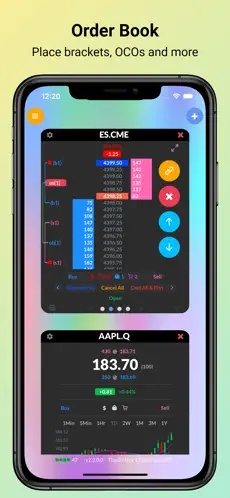
The official iOS illustration below shows the vendor's mobile order-book presentation. It contains historical example prices and is not a current quote, proof of stock-trading entitlement or a test on this VPS. The web application was inspected separately in this project; resizing a desktop browser would not constitute a physical iPhone/Android test.
Screenshot references
Common questions
Can I use the public free trial on mobile?
Rithmic’s current FAQ excludes Web & Mobile from that public paper trial.
Can desktop and mobile always stay connected together?
No universal allowance is established. Check the account provider.
Does closing the app flatten exposure?
Do not assume so. Check server-reported positions and orders.
Is the app free of all trading/data charges?
A free download does not remove provider, exchange or account charges.