
In Quantower, open the connection manager, choose Rithmic, enter the issued credentials and select the provider-assigned server. For plugin mode, enable Use RTrader in the connection settings and start the matching RTrader Pro host first.
Educational software guidance. Trading involves risk. Read the financial and information disclaimers.
Configure the intended route
- Confirm that the account and your Quantower licence support the connection/features you need.
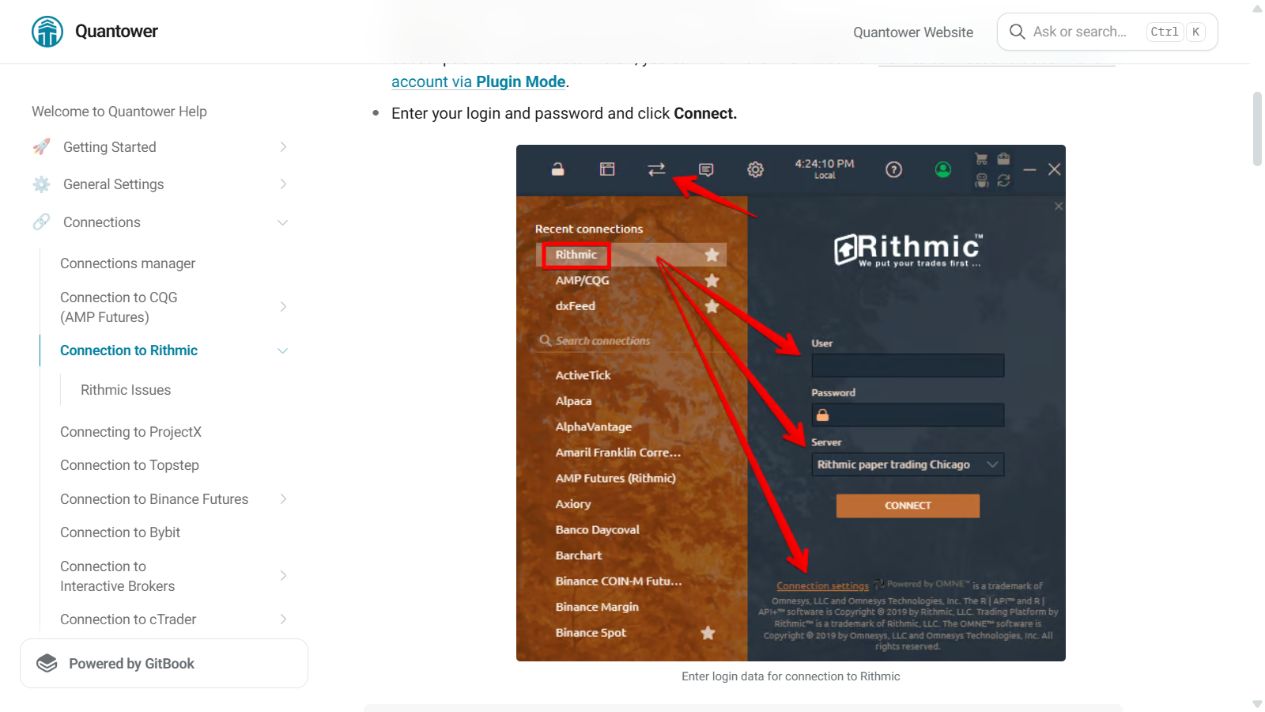
- Open the connection manager and select Rithmic.
- Choose the exact provider server. The vendor page's demo/live defaults do not override a firm's issued configuration.
- Enter the Rithmic login and password privately.
- For a direct connection, use the documented direct route and check the provider's concurrent-data-session allowance.
- For plugin mode, open Connection Settings → Use RTrader. RTrader Pro must already be running with plugins enabled and matching credentials/server.
- Connect, inspect the account list and resolve a dated contract before enabling strategies.
Enable MBO only when entitled
Quantower documents Enable 'Market by Order' (MBO) mode in the connection settings. Its DOM Trader display uses Settings → Columns → Bids/Ask → Size coloring scheme → MBO, with column wording depending on split mode. Changing a display setting does not buy data entitlement.
If connection or history fails
Distinguish authentication, missing exchange access and an unavailable plugin host. Use the Event Log and Quantower's Rithmic issue guide. For incomplete history, narrow the requested range and inspect the history-server setting; do not start by deleting platform databases.
Source checked 7 October 2026: Quantower official connection guide.
Screenshot references
Common questions
Does Use RTrader work without the host?
No. The supported plugin host must be running and connected.
Are all Quantower features free with Rithmic?
Do not assume that. Connection access, multiple connections and analysis features can have separate licence conditions.
Does MBO mode grant market depth?
No. The provider must authorize the data.
Does a connected icon prove trades will fill?
No. Account availability, risk checks and actual order responses are separate.