
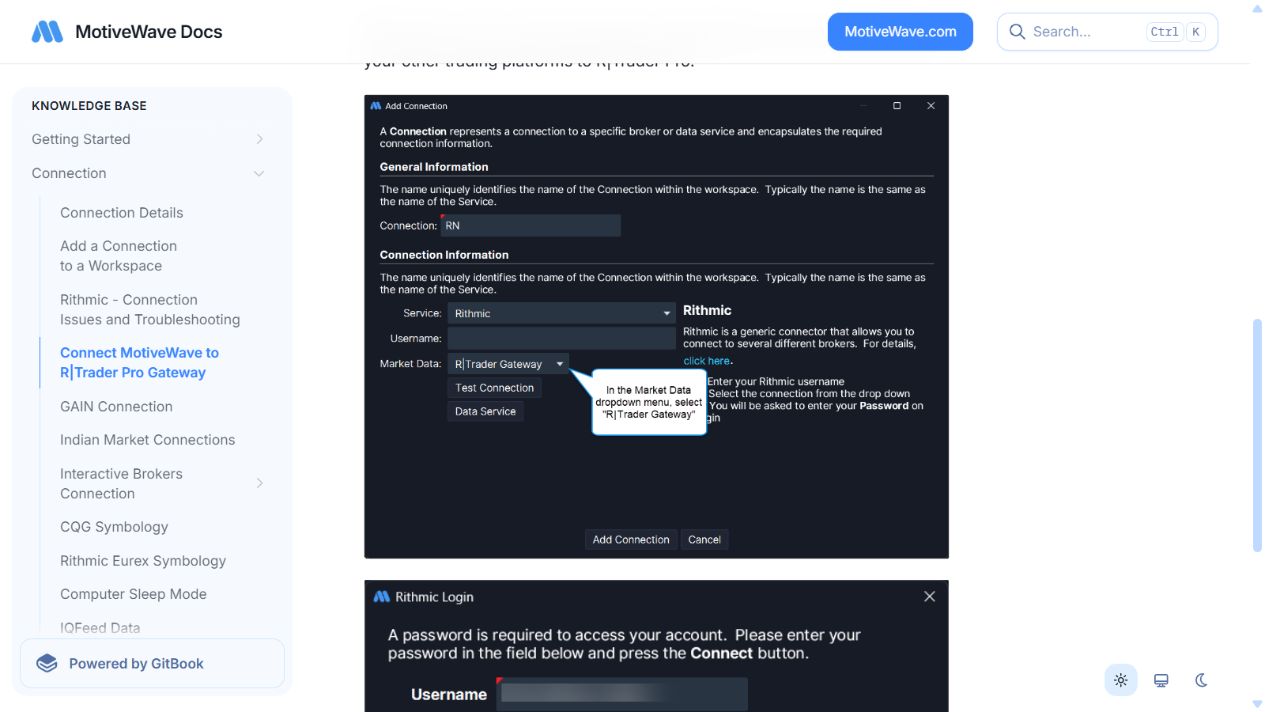
For MotiveWave’s RTrader gateway route, start RTrader Pro with Allow Plugins enabled, then select R|Trader Gateway in the Market Data dropdown of the MotiveWave Rithmic connection. Use the provider-issued service details and keep the host running.
Educational software guidance. Trading involves risk. Read the financial and information disclaimers.
Configure the gateway route
- Install the supported RTrader Pro application; the vendor distinguishes it from the older regular RTrader product.
- Enable Allow Plugins in the host login configuration and connect using the provider's details.
- Open the Rithmic connection configuration in MotiveWave.
- Set Market Data to R|Trader Gateway as described in the vendor guide.
- Match the intended credentials and service configuration, then connect.
- Confirm that the desired account and dated instrument are present before enabling any automated strategy.
Distinguish market data from order handling
A chart receiving quotes does not establish the order destination or the behavior of an exit strategy. Check the actual trading account, selected contract and local strategy settings independently. The gateway route does not prove every broker feature or every MotiveWave edition is supported.
When the gateway cannot be reached
Check that the Pro host remains connected, plugins are enabled and the route selected in MotiveWave matches the intended architecture. Preserve the full connection error. Do not silently change to a direct connection if that would create an unapproved extra data session.
Plugin-based sharing can change session usage, but subscriber classification and billing still depend on current exchange/provider rules. It is not a blanket professional-fee exemption.
Source checked 7 October 2026: MotiveWave official connection guide.
Screenshot references
Common questions
Is regular RTrader the required host?
The cited route requires RTrader Pro.
What dropdown selects the gateway?
The MotiveWave connection’s Market Data dropdown: R|Trader Gateway.
Can I close the host after connecting?
Keep the required host running for the gateway route.
Does this confirm an automated exit test?
No. It documents the vendor connection configuration, not a strategy execution result.