
Jigsaw daytradr offers direct Rithmic and Rithmic RTrader Pro connections. For the plugin route, start the Pro host with Allow Plugins enabled and set Login via RTrader Pro in daytradr. For direct access, leave that option off.
Educational software guidance. Trading involves risk. Read the financial and information disclaimers.
Choose the correct connection type
Open daytradr's Connection Manager. Use the direct Rithmic route or Rithmic RTrader Pro according to the intended architecture. Jigsaw documents that checking the Pro-login option for a direct API route can create a connection-error loop.
Configure the Pro route
- Start RTrader Pro and enable Allow Plugins.
- Connect its order/data sections using the provider's issued details as applicable.
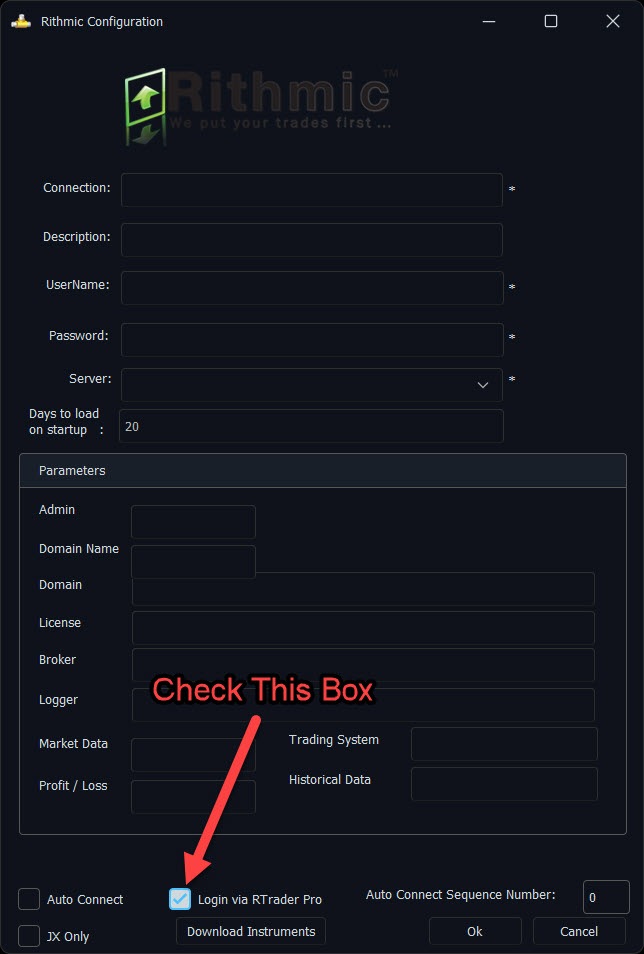
- In daytradr, name the connection so you can recognize it, then enter the Rithmic username/password and assigned server.
- Enable Login via RTrader Pro. The vendor illustration below highlights this control.
- Leave manual connection parameters alone unless the provider gives exact values for a server absent from the list.
- Save, connect and inspect the intended account/instrument.
The Days to load on startup setting controls the requested trade-history range; it is not a market-data-depth entitlement. Optional auto-connect settings should reflect a host-first startup order.
Check licence and release-specific behavior
Jigsaw's August 2026 release notes changed live-trading-licence requirements for evaluation and PA accounts. Check your account category and installed release rather than assuming every Rithmic user must buy the same add-on. The connection guide describes RAPI+ with server-side OCO; this is specific to Jigsaw's implementation.
Source checked 7 October 2026: Jigsaw daytradr official connection guide.
Screenshot references
Common questions
Does the connection name change my account ID?
No. It labels the saved configuration.
Should direct mode have Login via RTrader Pro enabled?
No. Jigsaw warns against that mismatch.
Can I invent custom server parameters?
No. Use provider-supplied values when the server is absent.
Is the image from an installed VPS session?
No. It is Jigsaw’s official configuration illustration, clearly attributed.