
ATAS supports a direct Rithmic connection and a connection through RTrader Pro. Choose one deliberately. Add Rithmic in Connections and use Connect via RTrader Pro only for the plugin route, with the host running and matching server/aggregation settings.
Educational software guidance. Trading involves risk. Read the financial and information disclaimers.
Add the connection
- Open Connections → Add, select Rithmic, then continue with Next.
- Read the displayed connection/OCO conditions before agreeing.
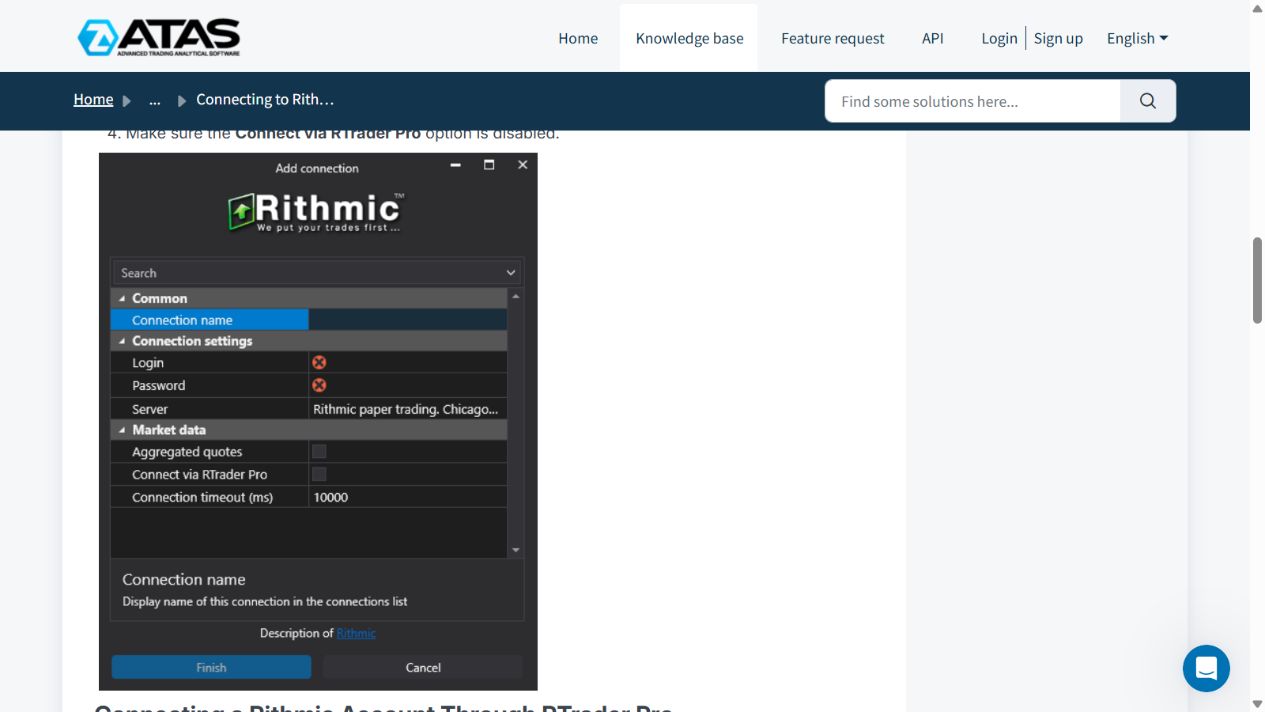
- Enter the issued credentials and server. Do not infer the server from an account's funded label.
- For direct access, leave Connect via RTrader Pro off and follow ATAS's restriction on competing connections using those credentials.
- For plugin access, start RTrader Pro with Allow Plugins enabled, then enable Connect via RTrader Pro in ATAS. Match the server and aggregation settings.
- Finish and connect, then inspect the connection status, instrument and account before order entry.
Know the plugin limitation
The vendor documents one Rithmic account connection through RTrader Pro for this ATAS route. Do not use it as proof that multiple unrelated Rithmic credentials can be merged in ATAS. Keep the host open.
Diagnose delayed data carefully
ATAS describes aggregation as a way to reduce update frequency and CPU pressure. It is not a universal setting to switch off or on blindly. A change can affect the detail available to analysis. Connection warnings and absent heartbeat data need investigation; a quiet instrument and a failed connection can look similar in a static chart.
ATAS's connection guidance warns about locally managed OCO. Establish the exact behavior of your selected route before depending on local software being closed during an open position.
Source checked 7 October 2026: ATAS official connection guide.
Screenshot references
Common questions
Should I always turn aggregation off?
No. Match the host/client requirements and understand the data-detail tradeoff.
Can direct and plugin connections be mixed casually?
No. Follow the route-specific connection limits.
Is an ATAS licence a data subscription?
They are separate requirements.
Was ATAS connected on this VPS?
No. The configuration reference comes from ATAS documentation; the RTrader host controls were inspected separately.