
Use TWS Layout Settings to save a known layout and recover one when windows move or disappear. Back up the current state before loading an older layout. A layout recovery is not a broker order recovery.
Educational software guidance. Trading involves risk. Read the financial and information disclaimers.
Step by step
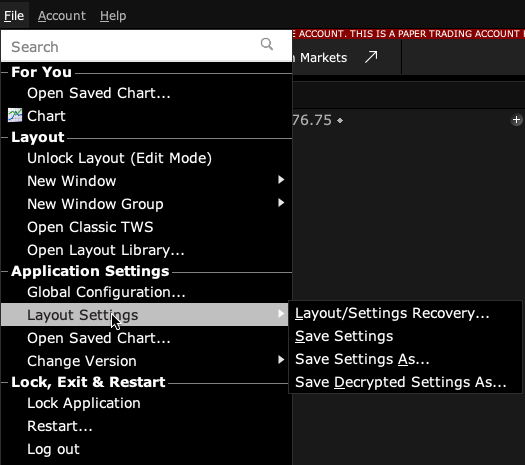
- 1 In Mosaic, open File → Layout Settings and save the current settings to a named backup.
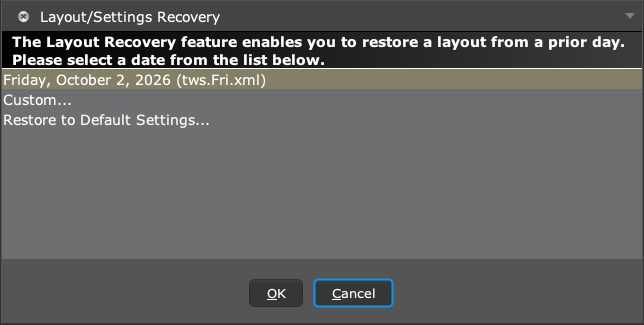
- 2 If a layout changed unexpectedly, open Layout Settings Recovery.
- 3 Choose the intended saved version or backup by its date and name.
- 4 Inspect watchlists, tools, and order-entry defaults after recovery.
- 5 Check account and working orders separately before resuming your normal workflow.
A practical example
After a screen change, a watchlist and an order window move off the place you expect. Save a copy of the current settings first. Then load the earlier known layout. Check more than the window positions: old defaults may return too. A saved layout is a screen and settings backup. It is not a backup that can undo fills, recover money, or change the broker’s past trades.
Screen reference
Mistake to avoid
Common questions
Does restoring a layout undo a trade?
No. Broker executions remain separate from screen settings.
Can settings move between computers?
IBKR provides save and server-storage workflows; follow the supported process and check the result.