
A useful support case shows one symptom, its time, and the exact action that caused it. Include the TWS version, platform, full error text, and a needed screenshot or log. Keep passwords and webhook tokens out of the case.
Educational software guidance. Trading involves risk. Read the financial and information disclaimers.
Step by step
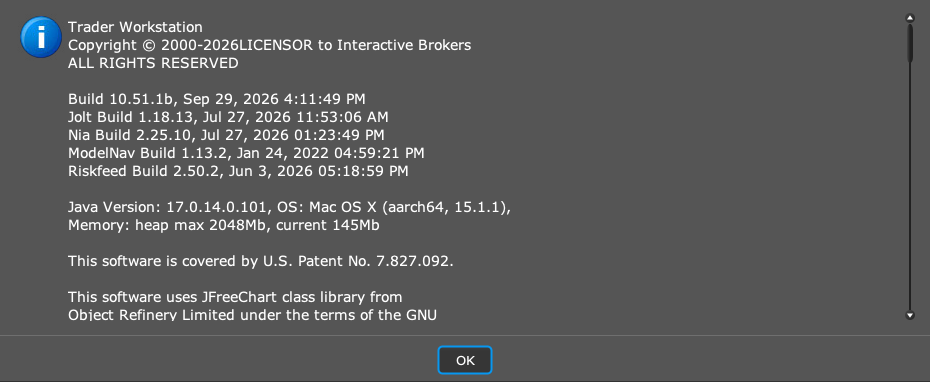
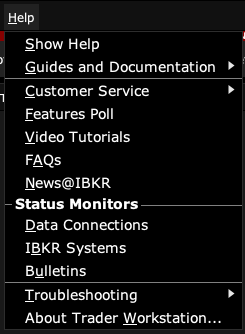
- 1 Record the TWS version from Help → About Trader Workstation and your operating system.
- 2 Write the shortest sequence that reproduces the issue and note whether it occurs in paper or live.
- 3 Add the full error, contract description, timestamp, and time zone.
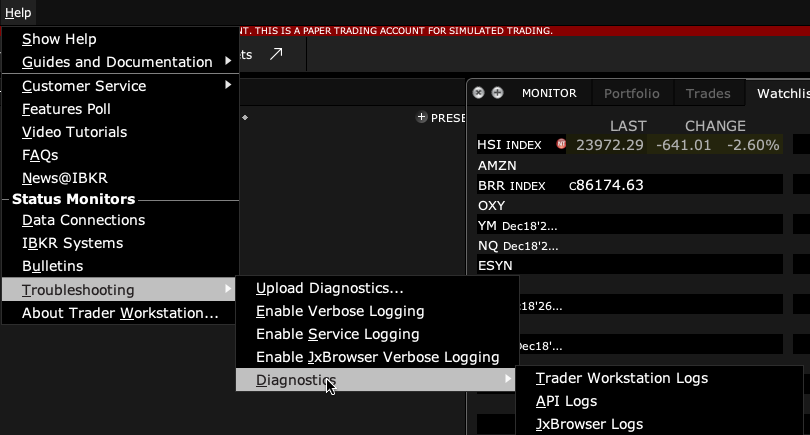
- 4 Attach a screenshot of the affected panel and the needed exported diagnostic log.
- 5 Explain the expected result and the actual result, plus any single change that alters the behavior.
A practical example
A useful short report could say: after I reconnect, one stock quote stays blank, while another quote updates. Add the exact product, time, version, and log. That gives support a clear comparison. A report that says the whole app is broken is harder to investigate. Keep the case small and repeatable. Include the screen that shows the issue, not a full desktop full of unrelated account details.
Screen reference
Mistake to avoid
Common questions
Should I include my password?
No. Support does not need it in an issue description.
What if the issue is intermittent?
Record several timestamps and what was happening before each failure.