
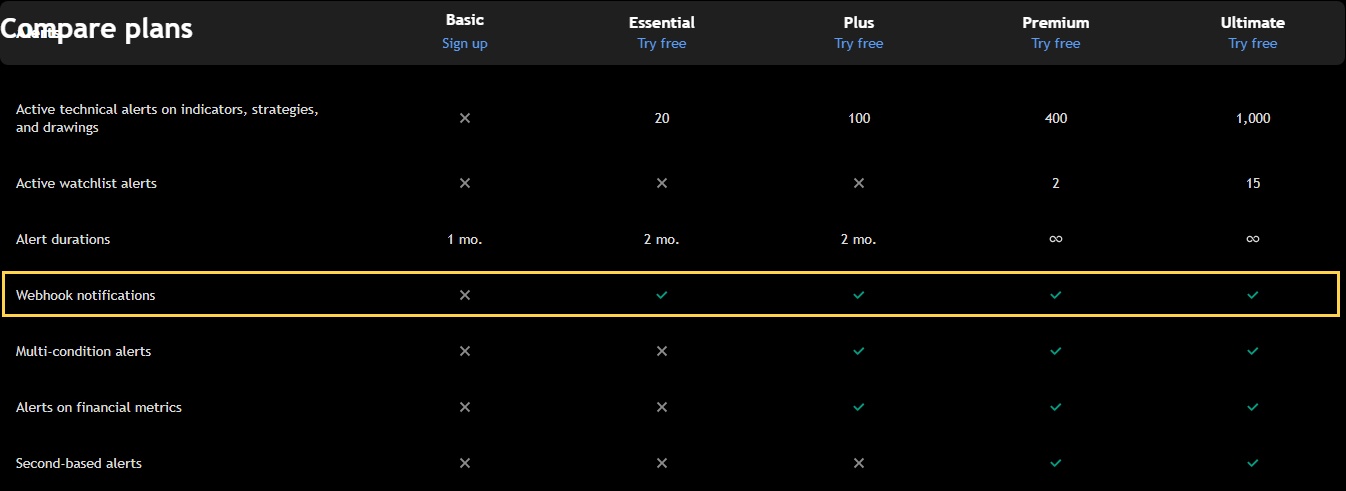
The official comparison inspected on 7 October 2026 shows webhook notifications from Essential upward; Basic does not include them. Check the separate technical-alert capacity and duration for the alerts you actually need, and enable required two-factor authentication. A subscription does not establish Rithmic account permission, exchange-data access or a tested automation route.
Educational software guidance. Trading involves risk. Read the financial and information disclaimers.
Current published comparison
The official pricing/features page showed:
| Plan | Webhook notifications | Active technical alerts |
|---|---|---|
| Basic | Not included | Not included in the inspected row |
| Essential | Included | 20 |
| Plus | Included | 100 |
| Premium | Included | 400 |
| Ultimate | Included | 1,000 |
Technical alerts are listed separately from price and watchlist alerts. Do not add those different categories and present the sum as available strategy-alert slots. The captured table is a dated public comparison, not an inspection of your subscription or a purchasing recommendation.
Check capacity before choosing a tier
- List the technical alerts required by the intended scripts and symbols.
- Include separate entry/exit alerts only when the integration actually requires them.
- Compare that number with the relevant current capacity, not only the price-alert limit.
- Check alert expiration/duration and plan-dependent features used by the script.
- Confirm classification, billing period, taxes and current terms directly before any purchase.
No universal monthly price is quoted here. The public page can show annual-billing equivalents and promotional/regional conditions; those are not necessarily the final monthly checkout amount.
Webhook access has separate prerequisites
TradingView's webhook guide requires two-factor authentication for webhooks. Use the account's current security interface to confirm it. This review did not change security settings or inspect a private account's enabled state.
Rithmic exchange data and the bridge/account connection also have separate requirements. Having a TradingView paid plan does not give you every exchange subscription or authorize copying and automation at a funding provider.
Common questions
Is Basic enough for the documented webhook workflow?
The inspected comparison does not include webhook notifications on Basic. Verify the current official offering and account features.
Can I use the price-alert count as my strategy-alert limit?
No. Check the technical-alert category that covers indicators, strategies and drawings.
Does a higher plan guarantee faster execution?
No execution benchmark was established. Alert triggering, network delivery, recipient processing and broker results remain separate.
Does upgrading update my existing script alerts?
Do not assume it updates their saved script/input/chart context. Follow the current alert documentation when changing that context.