
Start with connection eligibility, the issued System and the complete NinjaTrader log entry. Then distinguish missing accounts, missing market data and rejected orders. Reinstalling or clearing a database is not a first-line fix for every Rithmic connection problem.
Educational software guidance. Trading involves risk. Read the financial and information disclaimers.
Missing Rithmic option or account
Rithmic's platform notice limits new onboarding while describing continued access for existing users. Apex's current guide describes Multi-provider configuration and Help → About → Evaluation (Rithmic) entitlement. Confirm applicability to your NinjaTrader login before adding or replacing connections.
Diagnose the failing layer
| Observation | Check next |
|---|---|
| Authentication rejected | Trading credentials and provider-issued System; website credentials are different |
| Connected but only local simulation visible | Entitlement, account assignment and the actual account selector |
| Account visible but no quotes | Exact expiry, exchange agreement, data entitlement and session hours |
| Quotes work but order rejected | Selected destination and full rejection; price data is not trading permission |
| Recent quotes but missing history | History range/source, logs and Rithmic's published download limit |
| Repeated disconnects | Timestamped logs, host/client route, resource pressure and current advisories |
An RTrader login working narrows the investigation but does not prove the NinjaTrader connector has the same permissions or subscription path.
Reconnect only after preserving state
Before disconnecting, inspect positions, working orders and local strategies. NinjaTrader's Rithmic-specific order-location guide places OCO management on the local PC. A remote order may remain active when that management stops.
Preserve the original log and make one evidence-based change at a time. Do not delete history databases, disable firewalls or select Rithmic 01 solely because an account is called funded. If duplicate orders appear, reconcile their IDs and sources before removing a connection or replaying signals.
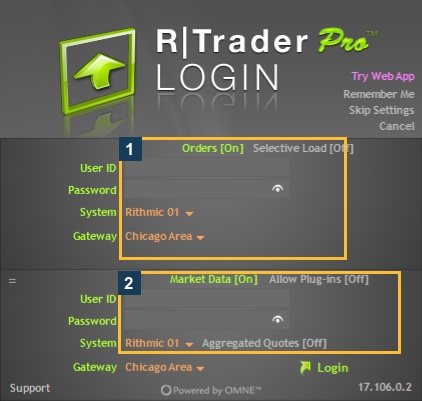
Screenshot references
Common questions
Should I choose the generic Rithmic provider by default?
Use the connector named in the applicable current provider guide; Apex documents My Rithmic for NinjaTrader Brokerage.
Does Help/About grant an entitlement?
No. It displays information; NinjaTrader controls the entitlement.
Should I delete the database for a login failure?
No. Authentication and permission problems need their own evidence.
Does a green indicator prove working protective orders?
No. Inspect the actual order states and local dependencies.